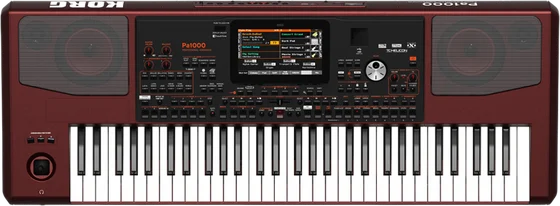
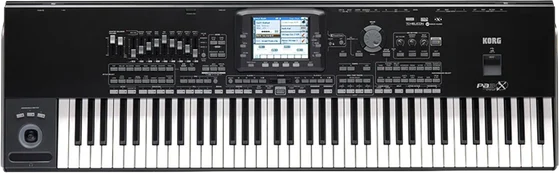
Arrangium converts a Pa1000 SET into a Pa3X SET. This direction was measured at file level on real SETs. Below you can see what happens to each type of content in this direction.
The file layouts of the two models. Rows that differ are marked: that is where the conversion does its work.
DIFFERENT · 7 / 12
Pa1000Pa3X
Style object.STY v0.5.STY v0.5
STSSTS v2.0STS v1.0
Number of Fills44
Ending 3✓✓
PerformanceKEYBOARD SETPERFORMANCE
Sound (PCG)PCG v5.0PCG v3.0
Sample (PCM)PCM v0.0PCM v0.0
Multisample (KMP)KMP v5.0KMP v3.0
Voice PresetVOC v7VOC v2
Compressed samples✓✓
Sample RAM480 MB256 MB
Chord Sequence✓—
IN THIS DIRECTION
Pa1000 → Pa3X: what carries over, what changes?
Each card is one content type. The rules are read from the app’s code.
STYLEADAPTED
StylesStyleThe accompaniment: Intro, Variation, Fill, Break and Ending elements, each with Drum, Percussion, Bass and ACC1–ACC5 tracks. Not only a drum pattern.Stored in: .STY · .stg are rebuilt in the target’s body
The Style is brought down to the Pa3X layout: the header is reduced and, if needed, the body is rebuilt from the target. A Style ElementStyle ElementOne of the Style's Intro, Variation, Fill, Break or Ending elements. Each element holds its own tracks and Chord Variations (CV). The number of elements depends on the model. the target does not have is dropped.
SOUNDADAPTED
SoundsSoundA playable program built from one or more oscillators (multisamples) with filter, envelope and effect settings. Styles, the keyboard and pads call it by bank and number.Stored in: .PCG are brought down to the PCG v3.0 layout
Sounds go down from the PCG v5.0 layout to the PCG v3.0 layout. Only fields that exist just in the newer layout are not written; factory Sounds are remapped by name or by address.
SAMPLECARRIED
Samples carry over
User samples and multisamples are written in the Pa3X SET’s layout; the sample itself does not change.
RAMADAPTED
Smaller RAM in the target: 480 MB → 256 MB
If the SET does not fit, it is measured first and made to fit with Fit to RAM or REMAP. A conversion that does not fit is rolled back and the reason is stated.
PERFORMANCEADAPTED
KEYBOARD SET → PERFORMANCE
PerformancesPerformanceOn the Pa3X and earlier generations, stores the keyboard sounds and settings. The Pa4X generation and the Pa5X use the Keyboard Set for this; the two are not identical.Stored in: .PRF are re-encoded in the target’s layout; the version is lowered going down and kept going up.
VOICE PRESETADAPTED
Voice Presets are converted
Presets are converted from the VOC v7 layout to the VOC v2 layout.
SONGBOOKADAPTED
SongBook carries over
Set Migrator moves the SongBook to the Pa3X SET: if its versions are ones also seen in Pa3X SETs, it copies them as they are; if not, it rewrites the songs with the Pa3X template. Set Lists carry over only if they are in a version Pa3X reads.
CHORD SEQUENCEDROPPED
Chord SequencesChord SequenceA recorded chord progression that drives the Style. Kept inside the Style on the Pa4X generation and in its own file on the Pa5X.Stored in: .STY · .csc are dropped
Pa3X has no Chord Sequences.
QUARTER TONECARRIED
Quarter-tone presets carry over
Both models carry quarter-tone presets.
GLOBALADAPTED
GlobalGlobalThe instrument's general settings: master tune, scale, velocity curve, transpose, split point, language.Stored in: .GBL settings are adapted
Set Migrator takes the Pa3X factory GLOBAL as its base and writes: master tuning, scale, key, style group levels, velocity curve and MIDI presets (names are shortened to 11 characters). The Pa3X file has no fixed velocity value. My Setting, bank names and language stay at the Pa3X factory values.
DETAILED TABLE
Pa1000 → Pa3X, row by row.
SOURCE
CONVERSION
TARGET
Pa1000Pa3X
What Pa5X KST content becomes in a Pa4X SET
Pa1000
CONVERSION
Pa3X
.STYSTYLE.STY v0.5
ADAPTED
.STYSTYLE.STY v0.5
rebuilt on a Pa3X template style
Drum · Perc · Bass · Acc1–Acc5
CONVERTED
Drum · Perc · Bass · Acc1–Acc5
Intro 1–3
CONVERTED
Intro 1–3
Variation 1–4
CONVERTED
Variation 1–4
Fill 1–4
CONVERTED
Fill 1–4
Break
CONVERTED
Break
Ending 1–3
CONVERTED
Ending 1–3
Keyboard Set 1–4v2.0
ADAPTED
STS 1–4v1.0
Pad 1–4
CONVERTED
Pad 1–4
Master FX · StyleFX A1–A2
CONVERTED
Master FX · StyleA-Master 1–3
Master FX · Keyboard SetFX B1–B2
CONVERTED
Master FX · STSB-Master 1–3
Insert FXIFX 1–2up to 2 per track
NOT CONVERTED
—no insert is written into the Pa3X style
EQTrimLowMidHigh
CONVERTED
EQTrimLowMidHigh
.PRFKEYBOARD SETKEYBOARDSET/*.PRF
ADAPTED
.PRFPERFORMANCEPERFORM/*.PRF
Performance objectKEYBOARDSET/*.PRF
CONVERTED
Performance objectPERFORM/*.PRF
Sound
ADAPTED
Sound
user sounds travel along; to a free slot when the address is taken
.PADPAD
LIMITED
.PADPAD
only the style’s pad number and mixer are written
.PCGSOUNDSPCG v5.0
ADAPTED
.PCGSOUNDSPCG v3.0
lowered to the Pa3X version
The sound object is rewritten in the Pa3X version
ROM multisamples are matched by name; without a match the number stays and is reported
User multisamples and samples travel with the sound
Factory sounds are matched to Pa3X factory sounds by name. A sound in the GM bank stays in the GM bank, at its own number. A sound with no counterpart by name is pointed at the nearest sound of the same kind (first the same program number, then the same GM family), and this is reported
OscillatorMultisampleVelocity
ADAPTED
OscillatorMultisampleVelocity
ROM multisamples matched by name
PitchBendPortamentoAMS
CONVERTED
PitchBendPortamentoAMS
The oscillator page is re-cut to the target's layout: bend, pitch AMS and portamento are kept
Fields only the newer layout has take their common value
Filter
CONVERTED
Filter
Amp
CONVERTED
Amp
EGPitchFilterAmp
CONVERTED
EGPitchFilterAmp
LFO
CONVERTED
LFO
FXFX 1–4
LIMITED
FXFX 1–2
FX 3–4 dropped
.PCGDRUM KIT · UserPCG v5.0
ADAPTED
.PCGDRUM KIT · UserPCG v3.0
Keys0–127
CONVERTED
Keys0–127
LayersVelocity Switch
CONVERTED
LayersVelocity Switch
Drum sample
ADAPTED
Drum sample
factory sample by name; a user sample travels with the kit
PitchTransposeTune
CONVERTED
PitchTransposeTune
AmpLevelAttackDecay
CONVERTED
AmpLevelAttackDecay
FilterCutoffResonance
CONVERTED
FilterCutoffResonance
EQ
CONVERTED
EQ
.KMPMULTISAMPLEKMP v5.0
ADAPTED
.KMPMULTISAMPLEKMP v3.0
KeymapZoneTop KeyOriginal Key
ADAPTED
KeymapZoneTop KeyOriginal Key
rebuilt in the Pa3X version
Sample linkID
ADAPTED
Sample linkID
linked by id
.PCMSAMPLEPCM v0.0may be compressed
CONVERTED
.PCMSAMPLEPCM v0.0may be compressed
AudioSample rate
CONVERTED
AudioSample rate
no resampling
The sample rate travels as it is; nothing is resampled
Compressionmay be compressed
CONVERTED
Compressionmay be compressed
Loop · One Shot
CONVERTED
Loop · One Shot
.VOCVOICE PRESETVOC v7
ADAPTED
.VOCVOICE PRESETVOC v2
The Voice Preset body is converted to the target’s layout (Pa1000 → Pa3X)
.SBDSONGBOOK
ADAPTED
.SBDSONGBOOK
In Set Migrator; songs whose version does not match are rewritten with the Pa3X template
Songs, their Style links and Set Lists are written to the Pa3X SongBook
A SongBook whose versions are also seen in Pa3X sets is copied as is; only each song’s Style link is pointed to its new location
Songs whose version does not match are rewritten with that model’s template song on Pa3X, Pa4X, Pa1000 and Pa700; on other targets the SongBook is not carried at all, and the report says so
Set Lists are carried only if they are in a version Pa3X reads; if the target already has a SongBook, it is left untouched
.QTPQUARTER TONEGLOBAL/QTPRESET.QTP
ADAPTED
.QTPQUARTER TONEGLOBAL/QTPRESET.QTP
named presets
Only presets that were given a name travel; on the target they go to slots still under a default name (“Scale n” / “QTPreset n”)
Set Migrator carries the whole set; Set Commander does it preset by preset on the SCALES tab (APPLY, UNDO)
If the target SET has no quarter-tone file, nothing is carried and the report says so
CHORD SEQUENCEStyle Settings
NOT CONVERTED
—the Pa3X does not save it
.GBLGLOBALSETUP.GBL
ADAPTED
.GBLGLOBALSETUP.GBL
In Set Migrator, on top of the Pa3X factory GLOBAL
The Pa3X factory GLOBAL files are the body; the Pa1000 file is not copied
Master Tuning
CONVERTED
Master Tuning
Scale · Key
CONVERTED
Scale · Key
Style group levels
CONVERTED
Style group levels
Velocity curve
ADAPTED
Velocity curve
same number; the curve tables differ
Fixed velocity
NOT CONVERTED
—the Pa3X file has no such byte
MIDI presets
LIMITED
MIDI presets
names cut to 11 characters
Other Global pagesMy SettingMIDILanguage
NOT CONVERTED
—stay at the Pa3X factory values
RAMPa1000480 MBPa3X256 MBSet Migrator fits it and reports what does not fit
What if it does not fit? Explore the optimisation.
SMART RAM OPTIMISATION
Keeps first. Optimises when it must.
Set Migrator compares the sample memory the selected content needs with the target instrument’s capacity. If it fits, samples are written as they are. If it does not, it offers sample compression, multisample thinning and leaving out unused multisamples, each with its estimated effect; the choice is yours.
Keep what fits. Optimise what does not, under your control.
1 · ANALYSE
Capacity analysis
Unique samples are counted once and compared with the target’s sample memory and sample-count limit. When a kit travels with only its struck keys, only those keys count.
EXAMPLE SCENARIO · NOT A MEASUREMENT
Example conversion result
CAPACITY EXCEEDED
Memory needed
288 MB
Target capacity
256 MB
Missing capacity
32 MB
target 256 MB
112% of capacity · 32 MB over
Without optimisation the example SET needs 32 MB more than the target instrument holds. Carrying it as it is does not make it fit in this scenario.
Example need: 60% of the source capacity (illustrative)
Drum Kit usage analysisOptional · chosen per kitThe styles’ note data tells which keys of a kit are really struck. A kit can travel with all its keys or with only the keys those styles strike; the choice is made per kit, and nothing is deleted from the source SET.
If even one selected style could not be measured, the kit travels whole.
A kit a Performance plays, or one picked on its own, travels whole.
By default a kit travels whole. Only the struck keys are chosen per kit: with KEYS on the kit’s row in Set Migrator, and per kit in Set Commander. The memory count follows the choice.
2 · DECIDE
Does it fit the target?
✓ FITSIf it fits, nothing is touched
The default answer is “keep as is”: no compression, no thinning, nothing that changes the sound.
KEEP AS IS
✕ DOES NOT FITIf it does not fit, you decide the method
When the target capacity is exceeded you can choose automatic optimisation or pick the operations by hand. Either way the results are shown for review before anything is written.
↓ 3 · METHOD
3 · METHOD
Choose the optimisation method
Automatic optimisation
OPTIMIZE FOR SIZE: compression (where the target supports it), zone thinning and leaving out unused multisamples together. Each step and its possible effect on quality is shown in REVIEW; nothing is written before you approve.
Manual optimisation
Choose compression only or zone thinning only; on the CONTENT page thinning is marked for each Sound, Kit or Multisample. The changes are reviewed before anything is written.
4 · REVIEW
REVIEW: see the estimated result
In both modes the REVIEW step shows the estimated result and waits for your approval before anything is written. The estimate is an upper bound, not a promise.
5 · WRITE
Written on your approval, then checked
The converted SET is written after you approve and read back in the VALIDATE step. If the target is still over, it says so; the styles that do not fit are left for another set.
CONVERTED: same structure · ADAPTED: rebuilt in the target structure · LIMITED: part is dropped or a condition applies · NOT CONVERTED: no converter for this direction
PROOF
How was this direction tested?
Set Migrator’s matrix check runs this direction on real SETs: the SET is converted, read back from disk and validated. Cases that do not fit the target are rolled back by design.
MEASUREDIN CODE · NOT MEASUREDLIMITEDNOT SUPPORTED
FREQUENTLY ASKED QUESTIONS
Questions about Pa1000 → Pa3X
Yes. The Pa1000 → Pa3X direction was converted at file level on real SETs and read back. If a SET does not fit the target, the job is rolled back and the reason is stated.
User samples and multisamples are written in the Pa3X SET’s layout; the sample itself does not change.
Chord Sequences are dropped
Move your Pa1000 SET to a Pa3X SET.
Arrangium is not on sale yet. Leave your email on the home page and we will tell you when it launches.