




















ALL MODULES · 30 MODULES
Every Arrangium module.
Every module works in the same SET context. Below are all modules of the three families: what each does, its key capabilities and, where one is ready, its real screen.
01 · DISCOVER
Explore. Without changing anything.
Open your SET libraries, explore what is inside and find what you are looking for. Your source files are not changed while you look.
-
Dashboard & Projects
Manage your SET projects and workspaces from one place.
- Kanban, list and table views
- Add SETs, filters and favourites
- Quick access to every tool from the HOME cards
-
Global Search
Find different kinds of content across your loaded SET libraries with one search.
- One search across every SET
- Style, Sound, Drum Kit, Multisample and more
- Source SET, bank and slot
-
Set Explorer
Explore SET banks and their content without changing their layout.
- Inspect banks and slots
- Listen on the Style, sound and kit pages
- Read-only browsing
-
SET Content Overview
See how a SET is made up before you open it.
- A summary of ten content kinds
- Each row opens its editor
- RAM and sample capacity bars
-
Compare SETs
Compare two SETs file by file, and object by object inside a bank that differs.
- Differences file by file
- Differences object by object in a bank
- Nothing is written
-
Set Settings
See a SET’s settings and preset banks.
- GLOBAL and its sibling folders (Pa1X–Pa1000)
- Per-type folders on the Pa5X
- Preset banks on one screen
-
SET Report
Get the content of a SET as a report.
- Preview inside the app
- Save as HTML, xlsx or CSV
- SET report from the dashboard card menu
-
Factory Browser
Browse a model’s factory Styles and Sounds on a drawing of its front panel.
- Factory Styles and Sounds
- The bank and page layout of the instrument
- Factory list per model
-
Yamaha Set Explorer
Open and explore Yamaha sets in Set Commander’s language.
- Browse Yamaha sets and styles
- Transfer to Korg dialog
- Play with OPEN IN ARRANGER
02 · CREATE & EDIT
Edit. Without losing context.
Work on everything from Styles to Samples in the editor made for it, keeping track of the sound structure and of how content is linked as you go.
-
Style Studio
Edit Style elements, Tracks and rhythm behaviour.
- Intro, Variation, Fill, Break and Ending
- Eight arranger Tracks
- Mixer and Style settings
-
Event Editor
Edit the notes and supported MIDI control data inside a Style in detail.
- Note editing
- Velocity and controller data
- Cut, copy and move at event level
-
Live Arranger
Play the Styles of your SETs on your computer in real time.
- Intro, Variation, Fill, Break and Ending
- Chords from the virtual or a MIDI keyboard
- SONG BOOK and SET LIST pages
-
Sound Studio
Inspect and edit the structure and parameters of a Sound program.
- Oscillators and zones
- Pitch, Filter and Amp
- LFO, oscillator EQ and FX
-
Drum Kit Studio
Manage the Drum Kit layers and Sample assignments behind the 128 keys.
- ROM and RAM layers
- Sample mapping key by key
- Usage and sharing analysis
-
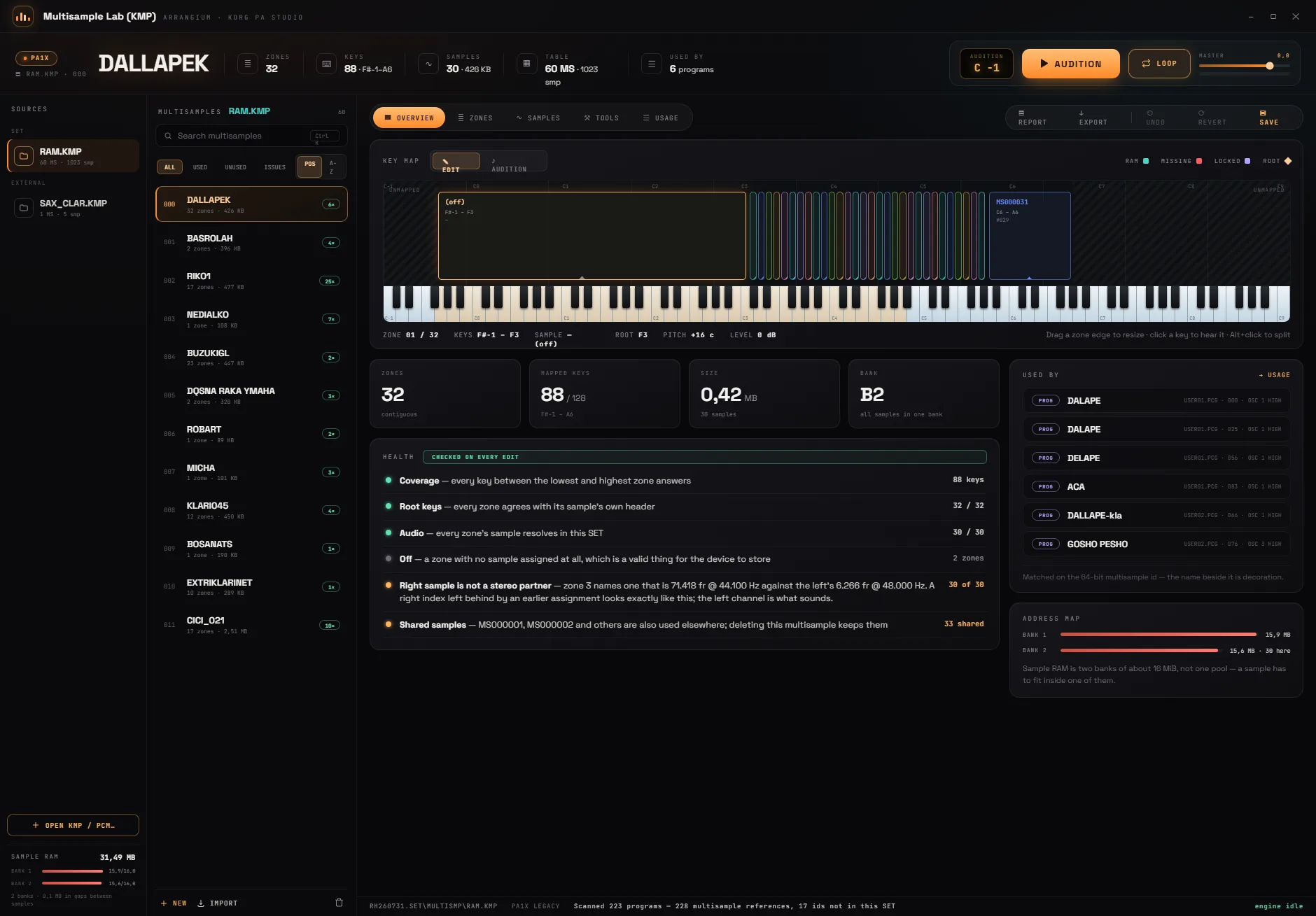
Multisample Lab
Map Samples to keyboard zones and edit the Multisample structure visually.
- Keymap editing
- Root key per zone
- Zone and Sample links
-
Sample Studio
Edit raw audio in detail on its waveform.
- Trim and cut
- Loop and gain
- Normalize and an undoable edit history
-
Pad Studio
Listen to pads with their sounds and edit their mixer settings.
- The PAD bank slot by slot
- Play a pad with its sound
- Mixer changes written in place
-
Keyboard Sets & Performances
Manage Keyboard Sets and Performances with the Sounds and performance settings they use.
- Four parts: sound, volume, pan, octave
- Sound links
- Written back to the SET with Performance Studio
-
Chord Sequences
Edit Pa5X Chord Sequences as a list of chords.
- bar.beat.tick and the panel’s chord text
- Both ways with the Event Editor’s chord lane
- Save sequences from the SongBook and styles
-
SongBook
See the Book, Set Lists and song entries with the Styles they link to.
- Browse the Book and Set Lists
- Load an entry and Save Song Book Entry in Live Arranger
- Relink Pa5X entries whose style is missing

03 · REPAIR & MOVE
Repair and move. See before you write.
Analyse missing references, manage sound links and transfer content between SETs together with what it depends on.
-
Sound Doctor
Analyse missing, foreign or unresolved Sound and Drum Kit references.
- Finds broken references
- Lists the Styles and content affected
- Missing link report
-
Sound Router
Re-point Sound addresses with rules and review the effect.
- Source / target mapping rules
- Effect preview with Dry Run
- Routing applied on your confirmation
-
Set Commander
Manage and transfer content between two SETs together with what it depends on.
- Two SETs side by side
- Transfer by Style, element or track
- Several source SETs, one confirm
-
Set Migrator
Convert a whole SET to another Pa model.
- Seven steps, SOURCE to VALIDATE
- Pick content before converting
- Options to fit the RAM
-
Classic SET → Pa5X
Convert classic SETs to a Pa5X .KST in one pass.
- Several SETs at once
- SongBook and quarter tones included
- A report like the instrument’s ConvertReport.txt
-
Import Style
Bring a Style into another SET with its sounds and samples.
- A step-by-step wizard that starts with an analysis
- Carries sounds, multisamples and samples
- Writes to a slot the target generation reads
-
Yamaha Import
Record Yamaha rhythms into a Korg SET.
- Into a copy of an existing style on Pa1X–Pa4X
- As a new style in a bank on the Pa5X
- A table of the Korg sound for each Yamaha voice
-
RAM Intelligence
Analyse how sample memory is used and what can be recovered.
- Sample Heat Map
- SET Health Report
- Memory and dependency analysis
-
Fit to RAM
Rank a SET’s RAM drum records by the memory they free.
- Ranked by RAM freed per strike
- Keep, silence or give a factory ROM sample
- APPLY as one transaction, UNDO to go back
-
Version History
See the kept versions of a file and go back to any of them.
- The list of kept versions
- Asks before it restores
- The current file is kept before it is overwritten